Military Benefits App
- 4.6
- Rating
- 10.00K
- Installs
- Free
- Price

 Analysis by App-foxy
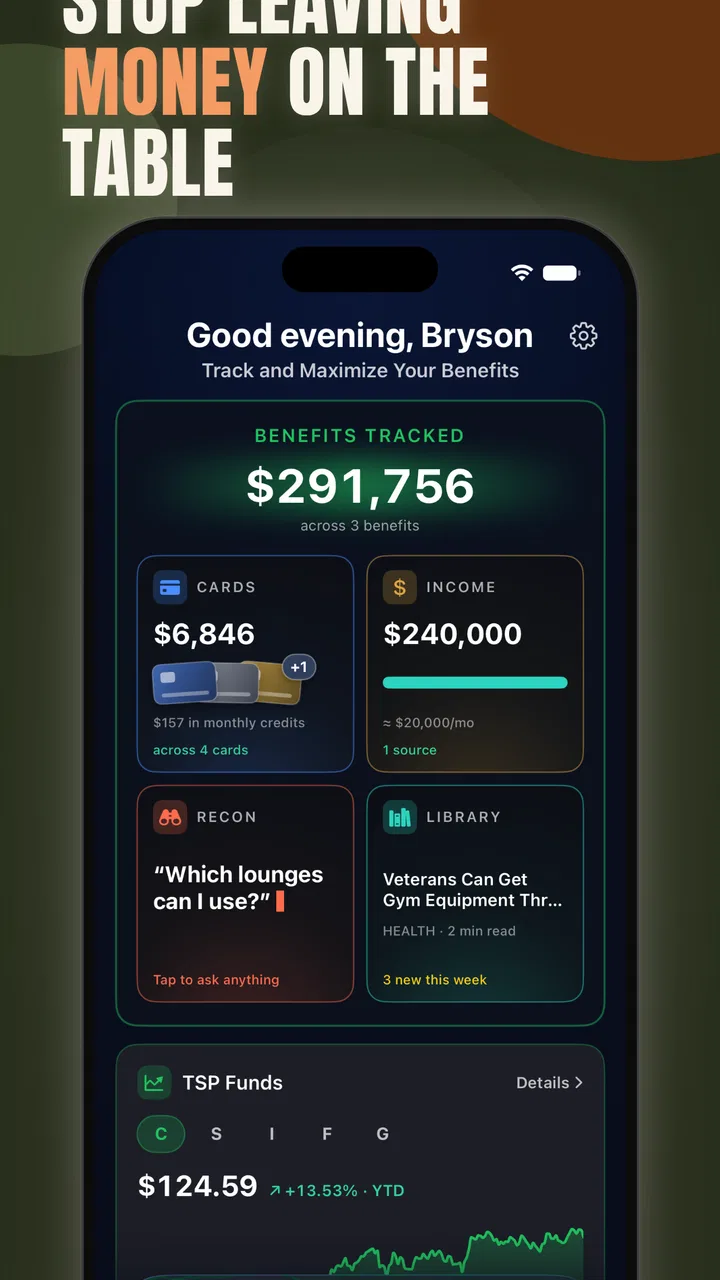
When military-related discounts and benefits are scattered across different places, the real challenge is not finding one attractive offer. It is remembering what applies to you, checking whether it is still useful, and keeping the information close when you are away from home. That is the problem Military Benefits App tries to solve. I see it as a practical lifestyle tool for service members, veterans, and military families who want a more organized way to look for savings and keep benefits in mind.
After spending time with the app, my impression is that its value depends less on flashy presentation and more on whether you will return to it regularly. It is free to download, carries an Everyone age rating, and is maintained by Military Benefits App. Its central appeal is simple: bring discount discovery and benefit tracking into one place instead of relying on memory, scattered notes, or repeated web searches.
The app has reached a 4.6 average from around 1.2 thousand ratings, with over 10 thousand installs. Those figures suggest that it has already found a receptive audience, although they should not replace your own judgment about whether its approach matches your routine. In my view, the strongest reason to try it is convenience. The strongest reason to hesitate is that an organizer is only useful when its information fits your personal situation and you are willing to keep using it.
You May Also Like

 AccuWeather: Weather Radar
AccuWeather Review: A Quick, Clear Forecast for Everyday Decisions
For everyday plans, the best forecast is the one you can understand quickly. AccuWeather makes rain timing, radar, and local conditions easy to act on, with a few trade-offs.

 Hill Climb Racing
Why Hill Climb Racing Still Turns Crashes Into One More Run
A tiny car, a bumpy hill and one more upgrade: Hill Climb Racing keeps resurfacing because its simple chaos makes every near-miss feel personal.

 AliExpress - Shopping App
AliExpress Makes Global Shopping Feel Personal, but Shoppers Bear the Risk
AliExpress turns a global marketplace into a pocket-sized discovery engine. Its reach is useful, its shopping loop compelling, and its trade-offs easy to miss.

 Lords Mobile: Kingdom Wars
Lords Mobile Is a Kingdom-Building Routine, Not a Quick Match
A case-by-case verdict on the building, battles, device demands, and social commitments that make Lords Mobile rewarding for some players and exhausting for others.

 PDF Scanner app - TapScanner
TapScanner Makes Paperwork Easier to Capture, Check, and Share
TapScanner makes scanning with a phone feel less like a rescue operation and more like a dependable step in getting work done. Its capture tools are useful, though not flawless.

 Block Blast!
 Shows How Much a Puzzle Game Can Leave Out
A quiet grid game shows why puzzle players increasingly value instant clarity, repeatable skill and low-pressure play—and where the genre still needs to catch up.
More From Our News Desk
View All News


How I Would Decide Whether It Fits
I’d decide by looking at the next few weeks of errands, travel, or family planning rather than by browsing out of curiosity. If military-specific discounts or benefit questions are likely to come up, the app has a clear job to do; if not, I’d wait until a concrete need gives it a fair test. That practical starting point leads to the situations where it has its clearest advantage.
Start with the kind of problem you want to solve
I would not choose this app simply because the phrase “military benefits” sounds useful. I would first ask what is currently wasting my time. If I regularly forget available discounts, lose track of benefit-related information, or search the same questions repeatedly, a dedicated app makes sense. If I already have a reliable system and rarely need military-specific information, installing another tool may add clutter rather than remove it.
That distinction matters because this is a lifestyle app, not a replacement for every official process connected with military service. I would treat it as a convenient companion for discovery and organization, while still using official channels when an application, eligibility decision, account update, or formal confirmation is involved. The app can help me remember where to look and what may be worth checking, but I would not make an important deadline or entitlement decision from a casual glance alone.
Think about frequency, not just occasional savings
The best candidates are people who encounter military discounts often enough for a central reference point to become worthwhile. A veteran planning errands, a military family comparing everyday expenses, or an active-duty user moving between locations may benefit more than someone who only searches for a discount once or twice a year.
I also think about travel and transitions. A move, a new duty location, a family change, or a shift from active service to veteran status can make old habits less reliable. In those moments, an app that keeps benefit-related information within reach may be more useful than a general coupon service. The benefit is not merely finding a lower price; it is reducing the mental effort required to remember which resources deserve attention.
Check your expectations before installing
The store summary points to two jobs: finding discounts and tracking benefits. I would therefore expect a focused utility rather than a broad social network, financial planner, or official case-management system. That is a healthy way to approach it. The app should be judged on how clearly it helps with those two tasks, not on features belonging to entirely different categories.
One practical question is whether you want discovery or documentation. Discovery means browsing for possibilities that might help with a purchase or service. Documentation means maintaining your own dependable record of dates, contacts, eligibility details, and official correspondence. The first is where this app is naturally positioned. For the second, I would still keep a separate, more deliberate record and verify important details through the responsible organization.
What the current release tells me
The current version is 1.0.11, and it runs on Android 8.0 or later. That makes it accessible to people who do not keep the newest phone, which is useful for anyone who prefers to hold on to a dependable device. At the same time, users on older Android versions will need to check compatibility before planning around it.
Because it is still a relatively focused product, I would pay attention to how comfortably it fits into daily habits rather than assuming that a long feature list is the goal. A clean route to the information I need is more valuable here than decorative extras. I would also keep the app updated, especially when using it as a recurring reference, because benefit and discount information can change independently of the app itself.
Where Military Benefits App Wins
Its strongest edge is being a focused first stop for military-related possibilities, rather than making you sift through general coupon results before finding relevant leads. I’d value that most when planning something with several moving parts, where a shortlist can guide follow-up checks. The flip side is that relevance alone does not settle eligibility, so it helps to know when a different tool should take over.
It puts a specific audience first
General coupon apps can be useful, but they usually make military status just one possible filter among many. This app starts from the opposite direction. Its purpose is already narrowed to the concerns of the military community, which saves me from repeatedly translating a broad search into a military-specific one.
That focus is especially helpful when I am in a hurry. Imagine that I am preparing for a family outing and want to know whether a military discount is worth asking about before I arrive. A general search may produce a mixture of expired pages, unrelated promotions, and vague advice. A dedicated benefits app gives me a more sensible first stop. I would still confirm the terms at the point of purchase, but I would spend less time deciding where to begin.
Tracking can be more valuable than browsing
The less obvious strength is the tracking angle. Many discount tools encourage endless browsing: scroll, notice an offer, forget it, and repeat the process later. A benefit-tracking approach can support a calmer workflow. I can review what matters to me, identify items that deserve follow-up, and avoid treating every available offer as equally important.
My advice is to use it as a personal shortlist rather than a catalog to consume from beginning to end. If I were organizing my own use, I would separate benefits into practical groups such as travel, household spending, family activities, and longer-term support. That makes a later check more purposeful. Instead of opening the app whenever I vaguely wonder whether something exists, I can open it with a specific question in mind.
A realistic everyday routine
Consider a veteran who is planning a weekend trip with a partner and children. Before booking anything, I would open the app to look for relevant military discounts and note which possibilities appear connected to the trip. I would then verify the final terms directly with each provider, because eligibility rules, dates, identification requirements, and exclusions can vary. On the day of travel, the app serves as a reminder of what to ask about rather than a promise that every discount will apply automatically.
That small change in routine can prevent two common mistakes. First, I am less likely to assume that a discount exists just because someone mentioned it months ago. Second, I am less likely to arrive unprepared and discover that I needed a particular form of identification or a different booking route. The app does not remove the need for judgment, but it can make the checking stage easier to remember.
It is approachable for a broad household
The Everyone rating is appropriate for a tool that may be used by different generations in the same family. A spouse, parent, adult child, veteran, or service member can approach it without needing a specialized technical background. That matters because benefit management is often shared informally. One person may discover an option while another handles the booking or paperwork.
I also like the fact that the app is free to start using. That lowers the risk of testing its workflow. You can see whether it fits your habits before deciding whether its additional paid items are relevant to you. The listed in-app purchase range runs from $12.99 to $59.99 per item, so I would not treat every extra as an automatic purchase. I would first use the free experience long enough to understand what problem a paid item would solve.
Its focused scope can reduce search fatigue
There is a quiet advantage in not having to explain your situation from scratch every time you search. A broad lifestyle platform may offer more categories, but that breadth can make a military-related task feel buried. Here, the subject itself gives the app a clearer purpose.
For me, that makes it a useful “first check” tool. I would open it before searching the wider internet, then move to an official source or provider when the decision becomes important. This two-step approach is more efficient than either extreme: relying on random search results alone or expecting one app to be the final authority for everything.
Where Another Option May Fit Better
For formal eligibility decisions, detailed household records, or broad everyday coupon searches, I’d choose an official source, a personal organizer, or a general deal service instead. Those alternatives are better matched to the final confirmation, long-term documentation, or non-military shopping work. With that distinction clear, the next question is how to add this app without creating another chore.
Official sources remain better for formal decisions
If I need to submit a claim, confirm an entitlement, update personal information, or interpret a rule that affects my family, I would choose the relevant official service over a lifestyle app. The reason is not that this app is unhelpful; it is that formal decisions require authoritative records and current instructions.
Military Benefits App is better suited to helping me notice possibilities and organize my attention. An official portal or agency contact is better suited to confirming what I am legally or administratively entitled to receive. Confusing those roles could create unnecessary stress, especially when a deadline or eligibility condition is involved.
General coupon services may be stronger for ordinary shopping
If my main goal is comparing supermarket prices, collecting broad retail coupons, or tracking commercial promotions unrelated to military status, a general coupon service may offer a wider selection. Its advantage would be breadth across everyday commerce. This app’s advantage is relevance to the military community.
The trade-off is straightforward. A broad service may help me find more ordinary deals, while this app may help me start with discounts and benefits that are more personally relevant. I would use the former for general price hunting and this one for military-specific discovery. They do not have to compete for exactly the same job.
A personal spreadsheet may still be better for detailed records
Some users want a full history: dates, renewal reminders, documents, contact names, eligibility notes, and links to official correspondence. For that kind of detailed recordkeeping, I would prefer a spreadsheet or a dedicated personal organization system that I already understand. It gives me control over the structure and makes it easier to store information that is unique to my household.
The downside is the work. A spreadsheet does not automatically feel like a benefits-focused starting point, and I would be responsible for discovering and maintaining everything myself. The app is more convenient for focused browsing and reminders of what deserves attention. My preferred arrangement would be to use the app for discovery and a private record for details that I cannot afford to lose.
Users who dislike recurring checks may feel limited
This app is not the right choice for someone who expects to install it once and receive a complete, permanent answer. Discounts change, personal circumstances change, and benefit rules can be conditional. The useful habit is occasional review, not blind trust.
That creates a small but real cost: attention. I would need to open the app when planning a purchase, relocation, trip, or family activity, and then confirm the important details. If that sounds like more effort than the potential value is worth, a simpler routine may suit you better. No benefits tool can create savings if it becomes another unused icon.
Paid items deserve a deliberate decision
The free entry point is appealing, but the in-app purchase range means I would examine the paid choices carefully. I would ask three questions before paying: does this solve a problem I have repeatedly encountered, will I use it more than once, and can I verify that it adds something beyond information I can already organize elsewhere?
I would be particularly cautious about paying during the first session. First learn the navigation, test whether the content is relevant to your status, and see whether the app fits your normal planning routine. A paid feature can be worthwhile for a frequent user, but the same purchase may be poor value for someone who only checks benefits occasionally.
What Switching to It Actually Involves
I’d introduce it through one upcoming decision and keep the workflow deliberately small: look for a relevant lead, confirm its current terms with the provider, and preserve any important result in a dependable personal record. That approach lets you judge whether the app reduces searching without relying on it as an archive or authority. From there, its lasting value becomes easier to assess honestly.
The setup cost is mostly behavioral
Moving from scattered searches to a dedicated app does not require a dramatic overhaul. The real change is remembering to open one focused tool before making a decision. I would begin with a single upcoming need, such as a trip, a large purchase, or a family activity. That gives me a clear test instead of asking the app to prove its value in the abstract.
Once I know the app’s rhythm, I would create a simple personal routine: check before planned spending, review anything I intend to rely on, and record important confirmations elsewhere. This avoids turning the app into a passive collection of possibilities. The goal is a repeatable decision process, not maximum browsing.
Keep verification as part of the workflow
The most important habit is to separate “found in the app” from “confirmed for my situation.” I would check the provider’s current conditions before assuming a discount applies. I would also pay attention to whether the offer depends on military status, service branch, location, timing, purchase method, or identification.
This is not a criticism unique to this product; it is the normal trade-off of discount discovery. Convenience comes earlier in the process, while certainty comes later. The app can shorten the path to a useful lead, but I remain responsible for the final check.
Protect the value of your own records
For benefits that affect long-term planning, I would keep a separate note with the date I checked, the official source I used, and any action still required. That approach gives the app a clear role without asking it to become my only archive. It is also useful when several family members share responsibility for decisions.
This combined workflow is one of the strongest practical insights I take from the app: use a focused tool to reduce discovery time, then use a personal or official record to preserve decisions. The two tools solve different problems, and forcing one to do both can create avoidable gaps.
Compatibility and cost should be checked early
Android users need version 8.0 or later, so I would check the phone before building a routine around the app. The app itself is free, but optional purchases range from $12.99 to $59.99 per item. That makes the initial trial low-risk, while the later decision deserves more care.
For most people, the cost of switching is not financial at first. It is the few minutes needed to decide whether the app’s organization matches the way they already search, shop, travel, and manage family information. If the workflow feels natural, it can replace several scattered starting points. If it feels like another place to check without adding clarity, uninstalling it is a reasonable conclusion.
My Recommendation
I’d give it a try if military-specific discovery comes up often enough to justify a dedicated starting point, then keep it only if it earns a place in your routine. Its free entry makes that trial straightforward, while any paid option deserves a separate decision based on repeated need. For occasional users, an official source or an existing system may be enough; for regular planners, the app can make the first step less scattered.
Who I would recommend it to
I would recommend Military Benefits App to active-duty users, veterans, and military households that regularly look for relevant discounts or need a more consistent way to keep benefits on their radar. It is especially suitable for people who currently depend on memory, informal recommendations, or repeated web searches.
I would also recommend trying it if you are entering a transition period. A move, a change in household responsibilities, or a new pattern of travel can expose gaps in an old system. Having a focused place to begin may make those gaps easier to spot, even when the final answer must come from an official source.
Who should skip it
I would skip it if you need an authoritative case-management system, detailed document storage, or guaranteed answers about eligibility. I would also skip it if your only goal is broad coupon hunting unrelated to military benefits; a general shopping service may be a better match.
People who rarely use discounts and already maintain a dependable benefits record may not gain enough to justify another app. The same is true for anyone unwilling to verify changing terms. This tool rewards active, sensible use rather than passive trust.
My final view
Military Benefits App earns its place as a focused starting point for military-related discounts and benefit organization. I like the decision it encourages: begin with a relevant source, narrow down what matters, and then confirm the details before acting. Its free entry point makes that experiment easy, while the optional purchases mean I would judge upgrades by repeated personal value rather than impulse.
My recommendation is to install it if you want a military-specific reference that can make everyday planning less scattered. Use it as a discovery and tracking companion, not as a substitute for official confirmation or a complete personal archive. The best results come from pairing its convenience with your own careful verification. For that audience, it is a sensible app to try; for everyone else, a broader coupon tool or a more formal record system may be the better choice.
FAQs for Military Benefits App
01What is the Military Benefits App used for?
The Military Benefits App is designed to help service members, veterans, retirees, and eligible family members find information about military-related benefits in one place. Depending on the version and provider, it may include benefit explanations, eligibility details, application guidance, important contacts, news, reminders, and links to official resources. It should be treated as an information and navigation tool rather than a replacement for official government services.
02Who can use the Military Benefits App?
Access is generally intended for active-duty personnel, National Guard and Reserve members, veterans, military retirees, surviving family members, and dependents who may qualify for specific programs. However, eligibility rules differ considerably between benefits, service periods, locations, and personal circumstances. Before relying on information shown in the app, users should confirm their status and requirements through the relevant official military or government agency.
03Does the app allow users to apply for military benefits directly?
Some versions may provide application links, forms, instructions, or contact information, but the app may not process every benefit application itself. In many cases, applications must be completed through an official government website, military portal, benefits office, or authorized organization. Review the destination carefully before submitting personal information, and make sure the website uses a secure, official domain.
04Is the information in the Military Benefits App accurate and up to date?
The app can be useful for organizing benefit information, but policies, payment amounts, eligibility rules, deadlines, and required documents can change. Updates may not always appear immediately, especially when information comes from multiple agencies or external sources. For decisions involving healthcare, education, housing, disability compensation, retirement, or financial assistance, verify the details with an official benefits office before taking action.
05Is the Military Benefits App safe to use?
Safety depends on the app’s developer, permissions, update history, privacy policy, and the websites it links to. Download it only from a trusted app store and check the publisher name, reviews, and requested permissions before installation. Avoid entering passwords, Social Security numbers, banking details, or other sensitive data unless you are certain you are using an official, secure service with a clearly stated privacy policy.
Pros
- Centralizes military discounts
- services
- and benefit information in one app.
- Search and category filters make relevant offers easier to find.
- Useful for active-duty members
- veterans
- and eligible family members.
- Can help users discover benefits they may otherwise overlook.
- Portable access is convenient when traveling or shopping away from home.
Cons
- Eligibility rules may vary by location
- service status
- or participating provider.
- Some listings may become outdated if partners change their offers.
- Coverage and usefulness can depend heavily on your country or region.
- Certain benefits may require separate registration or identity verification.
- The app may collect personal data when accessing account or benefit details.

Military Benefits App
Gallery